
Following documentation is taken from playwright official comments Selects option or options in <select>.
Details
This method waits until all specified options are present in the <select> element and selects these options.
If the target element is not a <select> element, this method throws an error. However, if the element is inside the <label> element that has an associated control, the control will be used instead.
Usage
<select multiple>
<option value=”red”>Red</option>
<option value=”green”>Green</option>
<option value=”blue”>Blue</option>
</select>
Suppose Above is the HTML, then you will write following code to select values
// single selection , thematching the value or label
element.selectOption('blue');

// single selection matching the label
element.selectOption({ label: 'Blue' });

//index
element.selectOption({ index: 2 });

// multiple selection for Books, Movies Music & Games options
element.selectOption(['Books', 'Movies Music & Games']);
@param values
Options to select. If the <select> has the multiple attribute, the first option matching one of the passed options is selected. String values are matching both values and labels.
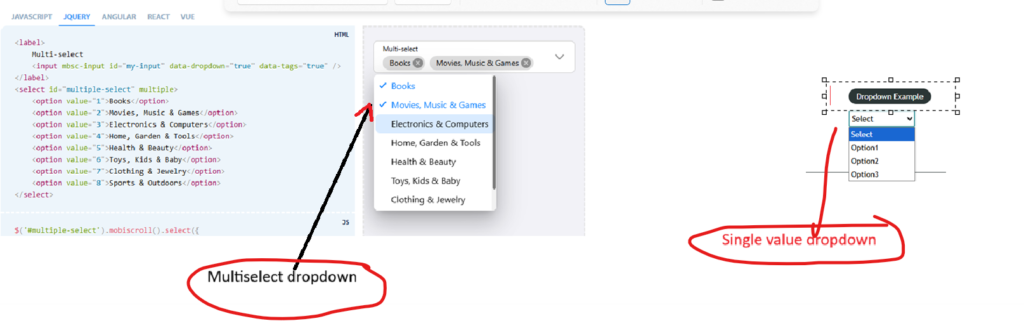
Now lets write method/function for dropdown. We can also merge following three functions into one, but for simplicity I have created 3 fucntions
export async function selectDropdownoption(dropdown:Locator,dropdownvalue:string)
{
    await dropdown.selectOption(dropdownvalue);
}

export async function selectDropdownoptionusinglabel(dropdown:Locator,dropdownvalue:string)
{
    await dropdown.selectOption({label:dropdownvalue});
}

export async function selectDropdownoptionusingindex(dropdown:Locator,dropdownvalue:number)
{
    await dropdown.selectOption({index:dropdownvalue});
}
Now lets learn about checkboxes
For checkboxes there are 2 main methods .check(); and uncheck()
Following is the code for checking checkboxes (single and multiple), you can go through comments to see what each line is doing and also use in your code.
export async function checkCheckboxFromGroup(
  checkboxGroup: Locator,
  values: string | string[]
) {
  // Convert single value into an array
  // This allows us to handle single and multiple selections using the same logic
  const options = Array.isArray(values) ? values : [values];

  // Loop through each checkbox value provided
  for (const value of options) {
    // Locate the checkbox input inside the group
    // We are using the 'value' attribute to uniquely identify each checkbox
    const checkbox = checkboxGroup.locator(
      `input[type="checkbox"][value="${value}"]`
    );

    // 👉 Action missing here:
    // At this point, the checkbox is only located, not selected.
    // You need to perform an action like:
     await checkbox.check();
     expect(checkbox).toBeChecked(); // This will assert that the checkbox is now checked

  }
For unchekcinging simpley use checkbox